Local businesses usually think their main problem is not getting enough leads. In reality, most of them already receive inquiries every day through their website, Google Maps, WhatsApp, or social media. The real issue starts after a lead arrives. Messages are checked late, responses depend on availability, follow-ups are forgotten, and serious prospects silently drop off. This creates lost revenue without the business clearly understanding why.
This blog explains, step by step, how we built a practical, production-ready lead generation and lead handling system for a local business using AI and n8n. The goal was not to add complexity or “AI hype,” but to build a system that works consistently, reduces manual effort, and improves conversions.
Business Background and Initial Challenges
The client was a local service-based business receiving leads from multiple channels. On paper, everything looked healthy. In practice, the workflow was fragile and heavily dependent on human memory.
The main problems were:
- Leads were coming from multiple platforms with no central system
- Response time varied from minutes to several hours
- High-intent leads were mixed with low-intent inquiries
- Follow-ups were inconsistent and often forgotten
- There was no visibility into which leads converted and why
This meant that even though marketing was working, sales performance was unpredictable.
Core Objective of the Automation
Before touching any tool, we clearly defined what success looked like. We were not trying to automate everything. We were trying to automate the right things.
Our objectives were:
- Capture every lead automatically, regardless of source
- Respond instantly so no lead feels ignored
- Use AI to understand what the lead actually wants
- Store lead data in a structured, searchable format
- Automate follow-ups without being aggressive
- Involve a human only when it truly matters
This clarity helped avoid unnecessary features and kept the system focused on revenue impact.
High-Level System Structure
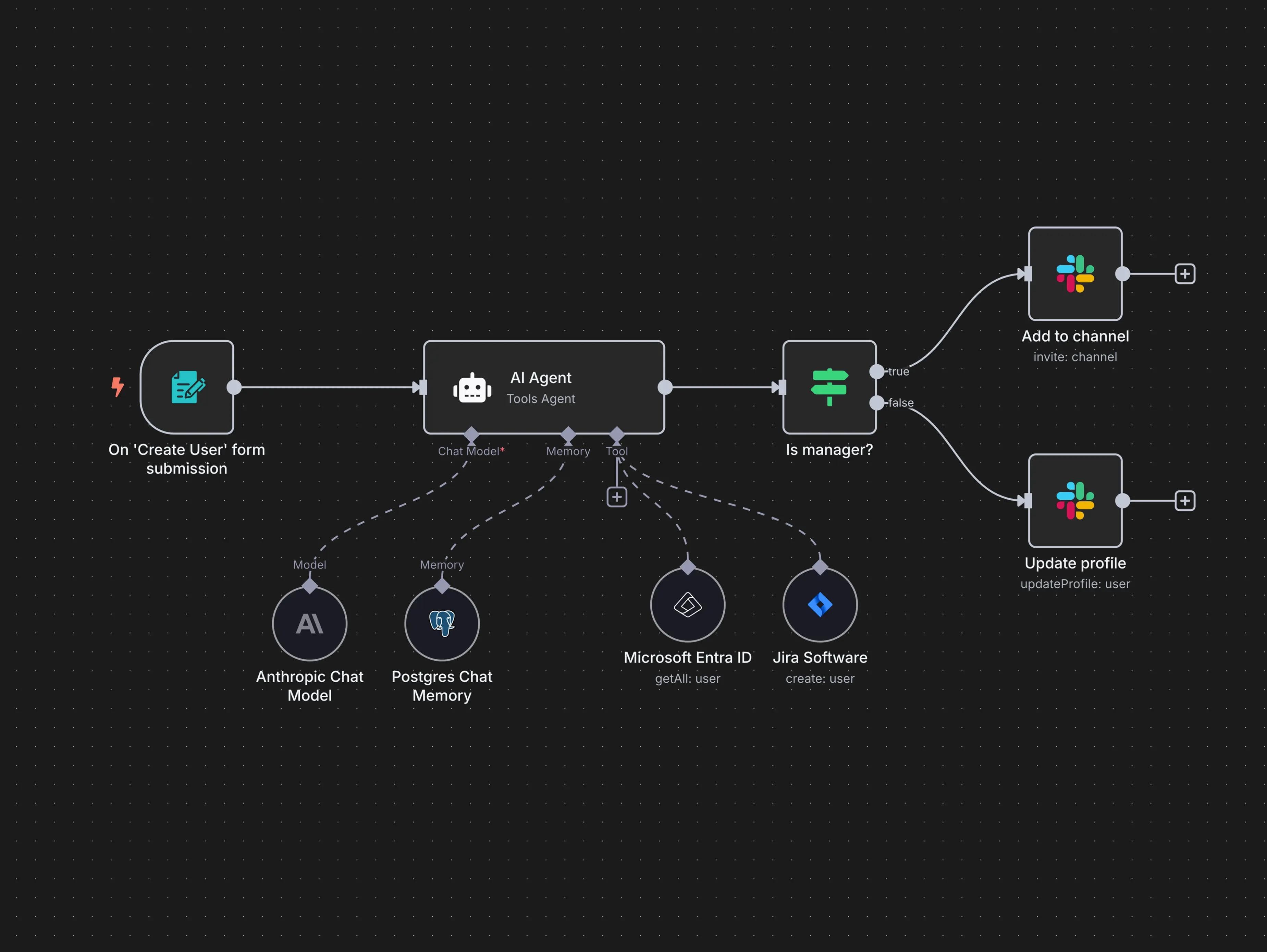
At a high level, the system works as a single pipeline instead of scattered tools.
Lead sources included:
- Website contact form
- Google Maps inquiries
- WhatsApp messages
All of these sources feed into one automation workflow built with n8n. From there, data is processed, analyzed, stored, and acted upon automatically.
This approach ensures consistency and removes platform dependency.
Why We Chose n8n
n8n was chosen because the system required real logic, not just simple trigger-based automation. The workflow needed conditional branching, retries, error handling, and tight control over how data flows between services.
Key reasons for choosing n8n:
- Full control over workflow logic
- Easy integration with AI APIs
- Ability to handle complex decision-making
- No hard limits that block scaling later
This made the system flexible enough to grow with the business.
Step 1: Centralizing All Lead Sources
The first technical step was centralization. Every lead source was connected so that all inquiries entered the same workflow.
This immediately solved several problems:
- No more checking multiple platforms
- No more missed messages
- All leads arrive in real time
- Consistent data structure from day one
Centralization is the foundation of any serious automation. Without it, intelligence and optimization are impossible.
Step 2: Data Cleaning and Normalization
Incoming lead data is rarely clean. People skip fields, use different formats, or write unclear messages. Before applying any AI logic, the data had to be standardized.
This included:
- Formatting names and phone numbers consistently
- Handling missing or optional fields safely
- Tagging each lead with source and timestamp
This step ensures long-term system stability. Skipping it usually leads to broken workflows and unreliable AI outputs.
Step 3: Using AI for Intent Classification
AI was used for one focused purpose: understanding intent.
Each incoming message was sent to an AI model with a carefully designed prompt. The model returned structured data instead of free-form text.
The AI classified leads into categories such as:
- High-intent service request
- Pricing inquiry
- General question
- Low-intent or unclear inquiry
This allowed the system to prioritize actions automatically.
Before vs After AI Intent Classification
Aspect | Before AI | After AI |
|---|---|---|
Lead priority | Manual guesswork | Automatic |
Response focus | Same for all leads | Based on intent |
Owner involvement | Constant | Only when needed |
Conversion quality | Inconsistent | Predictable |
AI was not used to replace sales conversations, but to ensure human attention was applied where it mattered most.
Step 4: Instant, Context-Aware Responses
Once intent was identified, the system sent an immediate response. Speed was more important than perfect wording.
The responses were:
- Short and professional
- Directly related to the lead’s message
- Designed to acknowledge, not close
This created a strong first impression and kept leads engaged until a human stepped in.
Step 5: Structured Lead Storage (Lightweight CRM)
Every lead was stored in a structured database acting as a lightweight CRM. This gave the business visibility it never had before.
Each lead record included:
- Contact information
- Lead source
- AI classification
- Conversation status
- Timestamps
This made it easy to track performance, identify bottlenecks, and improve the system over time.
Step 6: Automated Follow-Ups Without Spamming
Follow-ups were automated using clear rules instead of guesswork.
The logic was simple:
- If no response within a defined time window, send a polite follow-up
- If the lead replies, cancel all future follow-ups automatically
This ensured consistency while maintaining a human tone. No lead was forgotten, and no one felt pressured.
Step 7: Smart Notifications for Human Action
Human involvement was intentionally limited. The business owner received notifications only when:
- A lead was classified as high-intent
- A lead explicitly requested a call or meeting
- A follow-up sequence ended without response
This reduced interruptions and allowed the owner to focus on closing deals instead of managing inboxes.
Business Impact After Automation
The automation did not magically increase the number of leads. What it changed was how leads were handled.
Key outcomes included:
- Response time reduced from hours to seconds
- Zero missed high-intent leads
- Consistent follow-ups without manual effort
- Clear visibility into the sales pipeline
Most importantly, the business became less dependent on constant manual monitoring.
Why This Approach Works for Local Businesses
Local businesses do not need complex dashboards or experimental AI features. They need reliable systems that reduce chaos and protect opportunities.
This setup focuses on:
- Speed
- Consistency
- Prioritization
- Clarity
That is what turns existing leads into predictable revenue.
Conclusion
Automating lead generation is not about replacing people. It is about removing friction, eliminating missed opportunities, and allowing humans to focus on meaningful conversations.
For local businesses already receiving inquiries, a system like this often delivers a higher return than spending more on ads or traffic.